
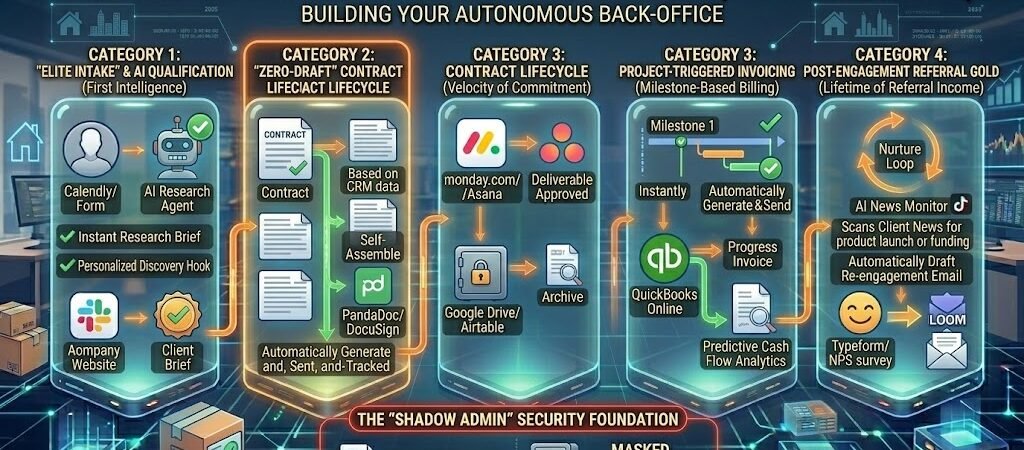
Key Takeaways: Zapier for Consultants & Coaches
- The 30-Second Discovery: In 2026, consultants are judged by the speed of their “First Intelligence.” Zaps now use Zapier Agents to research a lead’s LinkedIn and company data the moment they book, sending a personalized “Pre-Call Brief” to the consultant automatically.
- The “Zero-Draft” Contract: Drafting a custom coaching agreement is no longer a manual task. Zapier pulls deal terms from the CRM (e.g., HubSpot or Pipedrive) and uses AI-driven CLM (Contract Lifecycle Management) to generate, send, and track a legally-binding contract in seconds.
- Cash Flow Autonomy (Predictive Invoicing): 2026 automation doesn’t just send invoices; it predicts them. Zaps now monitor project milestones in monday.com or Asana and automatically trigger progressive billing in QuickBooks Online as work is completed.
- The “Shadow Admin” Safety Net: Using Zapier Tables, consultants maintain a “Single Source of Truth” that prevents “duplicate trash” (mismatched client records across Zoom, Calendly, and Stripe).
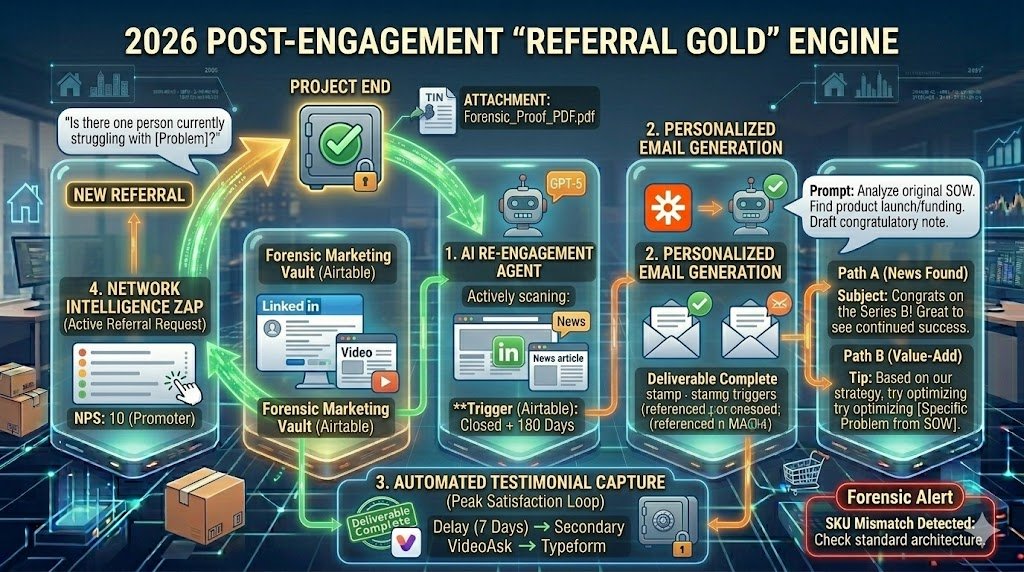
- The “Referral Gold” Engine: Automation extends 12 months post-engagement. Zaps trigger AI to analyze a past client’s public news (e.g., a promotion or funding) and draft a personalized “Congratulations” note to spark a re-engagement or referral.
Introduction: The “Luxury of Speed” in 2026
In the high-ticket consulting and coaching world of 2026, professional expertise is no longer the sole differentiator. Clients paying premium fees—often upwards of $5,000 to $50,000 per engagement—are no longer just buying your brain; they are buying an experience of seamlessness. The “luxury” of a modern consulting practice is defined by the speed of response and the invisible precision of its operations.
The Consultant’s Dilemma: Admin vs. Art
The primary challenge for the 2026 service provider is the “Admin Creep.” As your billable rate climbs, the opportunity cost of manual tasks—scheduling, lead research, drafting contracts, and chasing invoices—becomes staggering. If you are a consultant billing $500/hour, spending just four hours a week on administrative “friction” costs your practice $104,000 in annual lost revenue.
The 15-Hour Recovery Act
Data from tech-enabled independent practices in early 2026 shows a startling trend: consultants utilizing Agentic Orchestration (Zaps that don’t just move data, but perform “reasoning” tasks) recover an average of 15 hours per week. This isn’t just “saved time”; it is “reclaimed focus.” By automating the “Lead-to-Invoice” lifecycle, you shift from being the Administrative Assistant of your own business to being the Principal Architect of client results.
The Forensic Professionalism Standard
In 2026, “Forensic Professionalism” is the standard of having a zero-lag system where no detail is dropped.
- The 2024 Standard: You reply to an inquiry within 4 hours.
- The 2026 Standard: Within 30 seconds of an inquiry, the prospect has a personalized calendar link, and you have a 3-page AI-generated brief on their company sitting in your inbox.
This section sets the stage for a practice that operates with the efficiency of a 50-person firm, powered by a single “Invisible Team” of Zapier automations.
The High-Touch Automation: To balance automation with a personal touch, see the CRM integration features for coaches. This allows you to trigger personalized follow-ups after any discovery call.
Category 1: The “Elite Intake” & AI Qualification
In 2026, the standard for a high-ticket consultant isn’t just “answering the phone”—it’s arriving at the first meeting with a deeper understanding of the client’s business than they have themselves. This is achieved through Agentic Intake, where Zapier acts as a digital private investigator, qualifying and researching leads in the seconds between a form submission and a calendar booking.
1. The “Research Agent” Workflow: Instant Client Briefs
Top-tier consultants no longer spend the 15 minutes before a call frantically scrolling through a prospect’s LinkedIn. They use Zapier Agents to perform “Deep Research” automatically.
- The Trigger (Lead Intake): A new prospect books a discovery call via Calendly or submits a high-intent Zapier Form.
- The Action (Zapier Research Agent): Zapier triggers an AI Agent specialized in Lead Enrichment.
- The Logic: The agent scrapes the lead’s company website, recent news articles, and public LinkedIn profile.
- The Prompt: “Analyze [Company Name]. Identify their three biggest market challenges in 2026 and find one recent win I can congratulate them on. Draft a 1-page PDF ‘Pre-Call Brief’ for me.”
- The Delivery: Zapier pings you in Slack or Microsoft Teams with the brief. You now walk into the call with “forensic” insight, ready to lead with value rather than basic discovery questions.
2. Intelligent Scoring & Priority Routing
Not every lead deserves a spot on your calendar. In 2026, Lead Scoring is handled by AI that evaluates “Fit” and “Intent” beyond just budget numbers.
- The Scoring Zap: Using Paths by Zapier, your intake system branches based on the lead’s profile.
- Path A (The VIP): Lead from a $50M+ company with an immediate need. Action: Instant SMS alert to the consultant and a “Priority Booking” link sent to the lead.
- Path B (The Nurture): Lead with a smaller budget or longer timeline. Action: Automatically route them to a 6-month “Value-First” email sequence in ConvertKit or ActiveCampaign.
- The Benefit: You protect your most valuable asset—your time—by ensuring your “live” hours are reserved for the highest-ROI opportunities.
3. The “Discovery Mirror” (Pre-Meeting Personalization)
To build immediate trust, the “Elite Intake” system reflects the lead’s challenges back to them before you even speak.
- The Personalized Handoff:
- Trigger: Lead finishes the intake form.
- Action (AI Personalization): Zapier uses the form data to generate a custom “Welcome Video” or “Strategy Checklist” using Loom or Bonjoro integrations.
- Action (Email): The lead receives an email 10 minutes after booking: “Hi [Name], I noticed you’re struggling with [Specific Challenge from Form]. I’ve attached a quick resource on that to review before our call.”
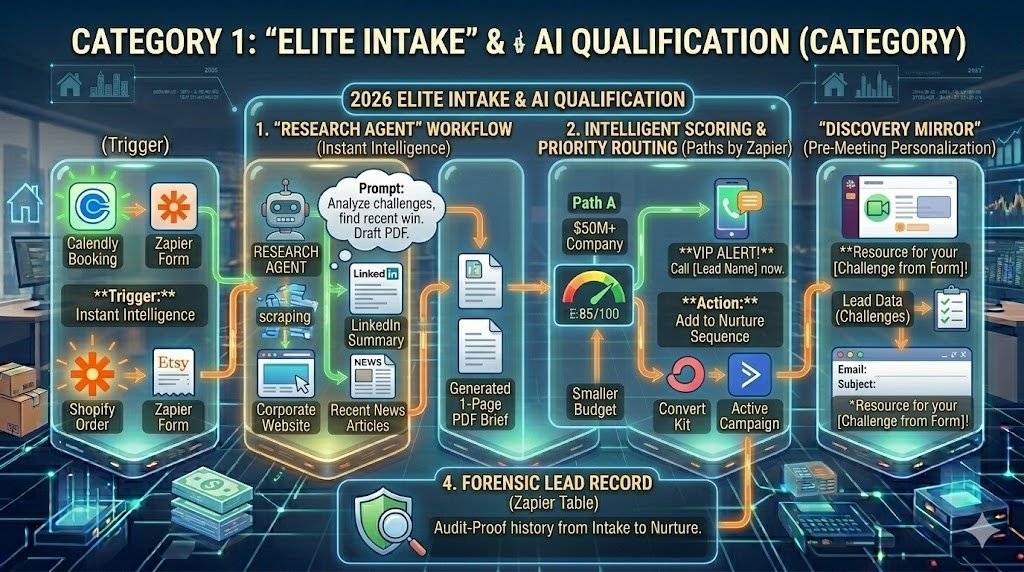
The 2026 Forensic Rule: Use Zapier Tables as your “Lead Master Record.” By storing the AI-generated research and scoring data in a central table, you ensure that if the lead disappears for six months and then returns, your system remembers every forensic detail of their previous inquiry.
Category 2: The “Zero-Draft” Contract Lifecycle
In 2026, the gap between a client saying “yes” on a discovery call and signing a legally binding agreement has been compressed from days to seconds. For high-ticket consultants, this “Velocity of Commitment” is vital. Any delay in getting a contract into a client’s inbox is an invitation for “buyer’s remorse.” The Zero-Draft Lifecycle ensures that your contracts are generated, customized, and sent without you ever opening a word processor.
1. Converting “Yes” to “Signed” in 60 Seconds
The moment a deal moves to the “Contract Requested” stage in your CRM (e.g., HubSpot or Pipedrive), the automation engine takes over.
- The Trigger (Deal Stage Update): You move a prospect to “Contract Pending” in your CRM.
- The Action (Data Extraction): Zapier pulls the specific deal terms: Project Fee ($20,000), Start Date (April 1st), Scope of Work (Executive Coaching), and Payment Terms (Net 15).
- The Action (PandaDoc/DocuSign Generation): Zapier sends this data to a “Smart Template.”
- The Logic: In 2026, templates are Modular. If the “Project Type” is “Strategy,” the Zap automatically inserts the “Intellectual Property” clause. If it’s “Implementation,” it inserts the “Liability Insurance” clause.
- The Result: The client receives a bespoke, professional agreement while the “Yes” from your call is still fresh in their mind.
2. The “Forensic” Signature & Archive Trail
A contract is only useful if it’s findable during an audit or a dispute. In 2026, manual filing is a compliance risk.
- The “Auto-Archive” Zap:
- Trigger: Document Signed in DocuSign or PandaDoc.
- Action (File Naming): Zapier renames the file using a forensic standard:
[Client_Name]_[Project_Type]_[Year]_SIGNED.pdf. - Action (Storage): The file is simultaneously saved to a secure Google Drive folder and a “Client Vault” in Airtable.
- The Result: You have a timestamped, immutable record of every agreement, organized by client and year, without lifting a finger.
3. The “Anti-Friction” Follow-up
If a contract sits unsigned for 48 hours, the deal is in the “Danger Zone.”
- The “Nudge” Logic:
- Trigger: Contract Sent but not signed after 48 hours.
- Action (AI Personalization): Zapier uses OpenAI to draft a gentle, non-aggressive check-in email: “Hi [Name], just checking in to see if you had any questions on the IP clauses we discussed. Looking forward to getting started!”
- Action: Sends the email via your Gmail or Outlook.
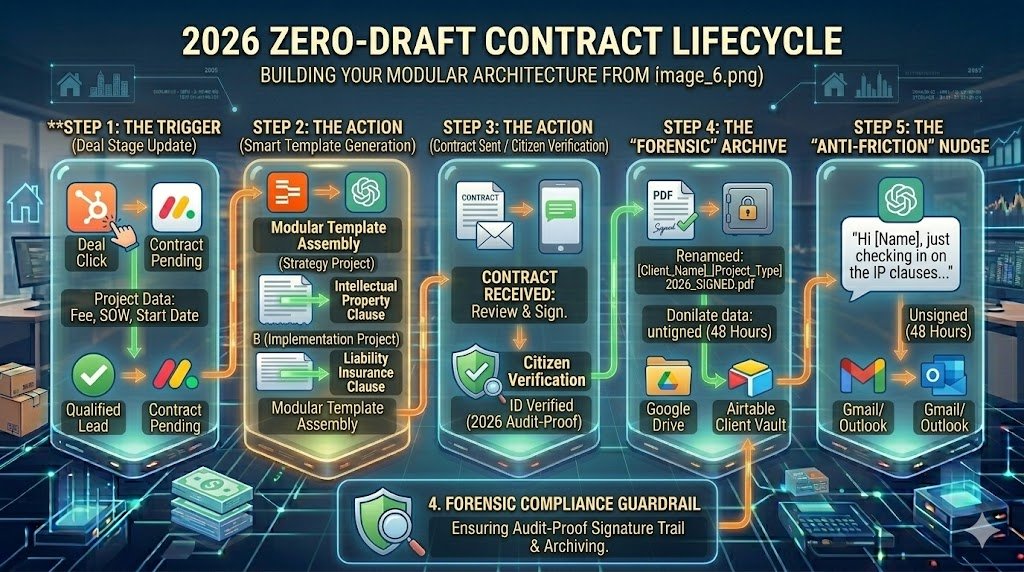
The 2026 Forensic Rule: Never send a contract with a “generic” scope of work. Use Zapier Formatter to take your CRM notes and clean them into a bulleted list for the contract. This ensures that the legal agreement perfectly matches the verbal “Handshake Deal,” preventing “Scope Creep” before the project even begins.
Category 3: Project-Triggered Invoicing & Cash Flow
In 2026, the traditional “end-of-month” billing cycle is an artifact of the past. High-performance consultants have shifted to Milestone-Based Invoicing, where payments are triggered not by the calendar, but by the actual completion of deliverables. This ensures that your “Cash Velocity”—the speed at which work converts to capital—remains high, and your accounts receivable never becomes a bottleneck.
1. Milestone-Based Billing: Getting Paid for Progress
Instead of waiting 30 days to bill, your project management tool (e.g., monday.com, Asana, or ClickUp) acts as the financial engine.
- The Trigger (Milestone Completion): A task marked “Phase 1: Discovery Completed” or “Strategy Document Approved” in your project board.
- The Action (QuickBooks/Xero Sync): Zapier detects the status change and automatically generates a progressive invoice for a pre-set percentage of the total contract.
- The “Smart” Attachment: The Zap doesn’t just send a bill; it automatically attaches the Acceptance Record or the PDF of the deliverable from your project board, giving the client “Forensic Proof” of the work completed.
- The Result: Invoices are sent at the moment of peak client satisfaction—immediately after a win—leading to faster approvals and higher payment priority.
2. The “Autopilot” Accounts Receivable (The Dunning Engine)
Chasing late payments is the most soul-crushing “Admin Tax” a consultant pays. In 2026, you never have to be the “bad guy.”
- The “Gentle Escalation” Zap:
- Trigger: Invoice hits “Overdue” status in QuickBooks Online.
- The Day +3 Reminder: Zapier sends a “Gentle Nudge” via SMS (using Meekhata or Twilio) with a direct payment link.
- The Day +14 Firm Notice: If still unpaid, Zapier triggers an AI-generated email that is firm yet professional, referencing the specific project milestone.
- The Benefit: According to 2026 industry data, automated reminder cadences reduce “Days Sales Outstanding” (DSO) by 30–40%, keeping your cash flow agile for growth.
3. Predictive Cash Flow Analytics
Because your Zaps are tracking every milestone and every invoice, you can now predict your income with 95% accuracy.
- The “Revenue Forecast” Zap:
- Trigger: A new project milestone is created in your PM tool.
- Action (Airtable/Google Sheets): Zapier pushes the “Expected Completion Date” and “Invoice Value” to a Financial Dashboard.
- The Result: You can see exactly how much cash is expected to hit your bank account in the next 90 days, allowing you to make “Forensic” decisions about hiring or marketing spend.
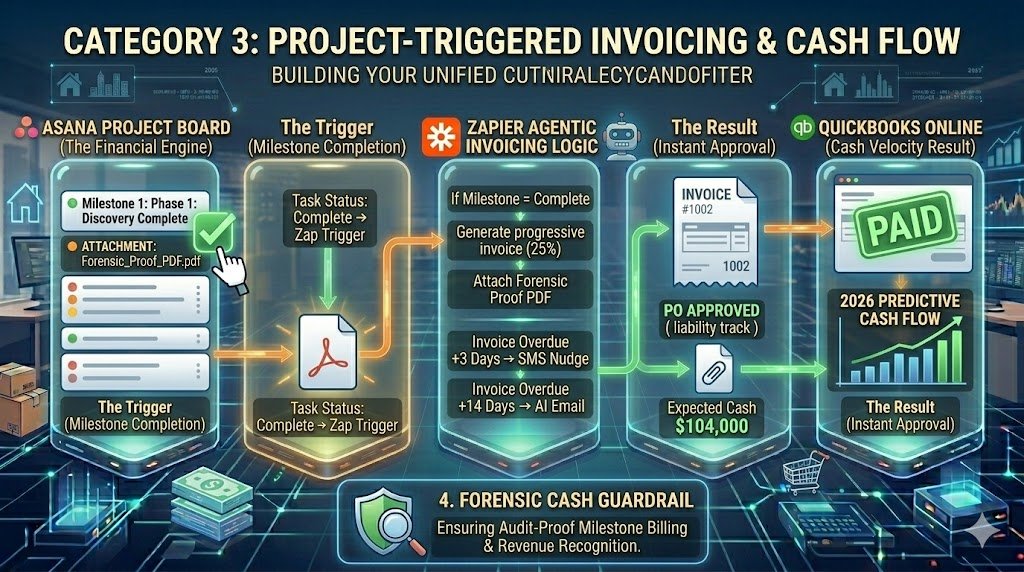
The 2026 Forensic Rule: Use Webhooks to verify payment before unlocking the next project phase. Set a Zap that automatically moves the next set of tasks from “On Hold” to “Active” only after the previous milestone invoice is marked as “Paid.” This protects your time from “Free Work” and ensures clients stay current on their commitments.
Category 4: Post-Engagement “Referral Gold”
In the 2026 consulting market, the “Final Deliverable” isn’t the end of the relationship; it’s the beginning of a long-term Asset Lifecycle. High-ticket consultants know that a past client is 5x more likely to refer a $50k deal than a cold lead is to book a discovery call. Section 5 details how to build a “Referral Gold” Engine that uses automation to stay top-of-mind for months—or years—after the project wraps.
1. The “Alumni” Nurture Engine: AI-Driven Re-engagement
Most consultants “ghost” their clients after the final invoice. In 2026, you use Zapier Agents to monitor your client’s success and reach out with “Surprise and Delight” value.
- The Trigger (Project Milestone): An Airtable record marks a project as “Closed + 180 Days.”
- The Action (AI Research): Zapier triggers an AI Agent to search for the client’s company news or the specific contact’s LinkedIn updates.
- The Prompt: “Search for news regarding [Client Name]. If they have a new product launch, a funding round, or a promotion, draft a personalized email. If no news is found, draft a ‘Value-Add’ tip based on the [Original Project Scope] we completed together.”
- The Result: You land in their inbox with a highly relevant, personal message that doesn’t feel like a “sales check-in,” sparking natural re-engagement.
2. Automated Testimonial Capture: The “Social Proof” Loop
Social proof is the currency of 2026. If you wait three months to ask for a testimonial, the emotional “high” of the project has faded.
- The “Peak Satisfaction” Trigger: The final project milestone is marked “Complete” and the final invoice is marked “Paid.”
- The Action (VideoAsk/Typeform): Zapier sends a request for a video testimonial or a LinkedIn recommendation.
- The Delay Logic: If no response, Zapier waits 7 days and sends a secondary nudge: “We’re putting together a case study on the [Results] we achieved. We’d love to include a 30-second quote from you!”
- The Forensic Storage: Once the testimonial is received, Zapier pushes the text and video link to your “Marketing Vault” in Airtable for your next proposal.
3. The “Network Intelligence” Zap (Triggering Referrals)
Sometimes the best way to get a referral is to ask when a client is already talking about you.
- The Logic:
- Trigger: A client completes a Net Promoter Score (NPS) survey with a score of 9 or 10.
- Action (Logic Path): Zapier triggers an automated—but personal—request: “So glad you’re happy with the results! Is there one person in your network currently struggling with [Problem] who could use our help?”
- The Result: You turn every “Promoter” into an active brand ambassador without manual follow-up.
Professional service security. Consulting and legal work both require strict document confidentiality. Discover the best automation for professional service firms to see how modern attorneys handle secure client intake and document management.
The 2026 Forensic Rule: Always use Zapier Tables to track “Last Contact Date” across all channels (Email, LinkedIn, Zoom). If your automation sees you’ve already had a manual conversation with a client this week, it should “Sleep” the automated nurture Zap to avoid looking like a robot. Authenticity is the only way to protect a high-ticket brand.
Conclusion: The “Orchestrated” Practice of 2026
The era of the “Consultant-as-Admin” has officially ended. In 2026, the market no longer rewards the expert who is “busy”; it rewards the expert who is available for high-level strategy because their operational foundation is autonomous. To remain competitive, you must transition from being a manual service provider to an Operations Orchestrator.
By implementing the “Lead-to-Invoice” framework, you aren’t just saving time—you are building a Competitive Moat. While other consultants are lost in a sea of manual follow-ups, mismatched contract versions, and overdue invoices, your practice operates with a “Forensic” level of precision. You provide a “White-Glove” experience that feels deeply personal to the client but is, in reality, powered by a sophisticated digital architecture.
Zapier allows the solo practitioner or the small boutique firm to compete with global agencies on speed, personalization, and reliability. In 2026, your professional legacy isn’t just the advice you give; it is the systemic excellence with which you deliver it. Reclaim your 15 hours a week, eliminate the “Admin Tax,” and refocus your energy on the only thing automation cannot replace: your unique creative genius.

About the Author
Aapt DubeyAapt Dubey is an automation specialist and software developer dedicated to eliminating manual workflows for small businesses. With deep, hands-on experience building complex Zapier integrations, API connections, and real-world applications, Aapt writes actionable, tested tutorials to help businesses scale efficiently.