
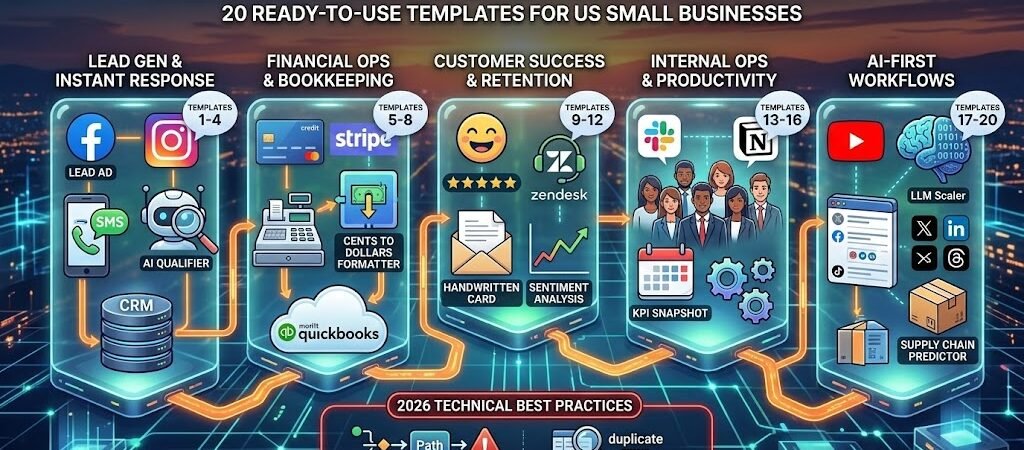
Key Takeaway: zapier templates
In 2026, automation is no longer about simple “if this, then that” triggers. Successful US small businesses have moved toward Modular Data Stacks, where every Zap includes built-in AI logic, data cleaning (Formatting), and error-handling paths. To stay competitive, your Zaps must act as “Digital Employees” that don’t just move data, but validate and transform it before it reaches your core databases.
Introduction: The State of Automation in 2026
The automation landscape for US small businesses has undergone a seismic shift over the last twenty-four months. If 2024 was the year of “testing” AI, 2026 is the year of Integrated Intelligence. For the modern SMB, Zapier is no longer a “background utility”—it is the central nervous system of the company. We have moved past the era of Point-to-PointZaps (where App A simply sends a raw notification to App B). Today’s high-performing workflows are Modular. This means they are designed to handle messy human input, verify security tokens, and use LLMs (Large Language Models) to make executive decisions mid-flow.
Explore the Library: Beyond our top 20 picks, there are thousands of community-built Zaps. You can explore the Zapier Template gallery to find niche workflows for almost any software combination.
The 20-Hour Dividend
The goal of the 20 templates provided in this guide is to achieve the “20-Hour Dividend.” By automating the “Data Plumbing” of your business—tasks like lead qualification, currency conversion, and sentiment analysis—the average small business owner reclaims roughly 20 hours per week. This isn’t just about speed; it’s about accuracy. In a world of rotating OAuth tokens and strict data privacy laws, a manual error in data entry isn’t just a nuisance; it’s a compliance risk.
The 2026 Standard: Human-in-the-loop (HITL)
As we dive into these templates, you will notice a recurring theme: The Approval Step. In 2026, we don’t let AI send invoices or delete records without a “Human-in-the-loop” (HITL) check for high-stakes actions. This ensures that while the heavy lifting is automated, the “Brand Soul” and final accountability remain with your team.
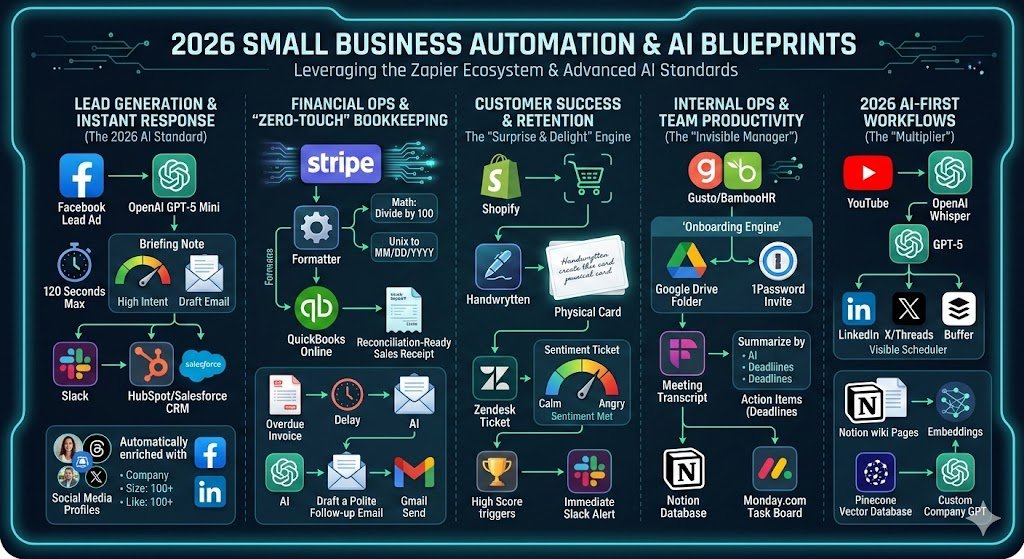
Category 1: Lead Generation & Instant Response (The 2026 AI Standard)
In 2026, “instant” is no longer fast enough. Research shows that lead conversion rates drop by 80% if a response isn’t initiated within the first 120 seconds. However, sending a generic “We received your message” email is a relic of the past. These templates leverage AI to ensure your first touch is hyper-personalized and data-enriched.
Template 1: The “Speed-to-Lead” AI Qualifier
The Stack: Facebook/Instagram Lead Ads + OpenAI (GPT-5 Mini) + Slack + CRM (HubSpot/Salesforce)
This is the flagship automation for 2026. Instead of a raw notification, your sales team receives a “Briefing Note.”
- The Logic:
- Trigger: New Lead in Facebook Lead Ads.
- Action (Formatter): Extract the first name and clean any “all caps” or “all lowercase” typing errors.
- Action (OpenAI): Send the lead’s “Reason for Inquiry” to AI with a specific prompt:“Analyze this lead: [Inquiry Text]. Categorize as High, Medium, or Low intent. Draft a 2-sentence personal response mentioning their specific problem and suggest a 10:00 AM meeting tomorrow.”
- Action (Filter): Only proceed to Slack if “Intent” is High or Medium.
- Action (Slack): Post the Lead details + the AI-drafted response + a “Click to Approve & Send” button.
Template 2: TikTok/Social Lead Enrichment
The Stack: TikTok Lead Forms + Clearbit + CRM
Social media leads are notoriously “thin” on data (often just an email and a name). This Zap flushes out the profile before it hits your sales pipeline.
- The Logic:
- Trigger: New Lead in TikTok.
- Action (Clearbit): Use the email address to find company size, industry, and the lead’s LinkedIn profile.
- Action (Paths): * Path A (Enterprise): If company size > 50, route to “Senior Account Exec” in your CRM.
- Path B (SMB): If company size < 50, route to “General Sales” and trigger an automated “Welcome Video” via Bonjoro.
Template 3: The Webinar Attendee-to-Sales-Pipeline
The Stack: Zoom/Luma + OpenAI + HubSpot
Don’t just sync a list; sync the engagement.
- The Logic:
- Trigger: Webinar Ended in Zoom.
- Action (AI): Analyze the “Q&A Log.” Identify attendees who asked technical questions.
- Action (HubSpot): Update the contact record with a “Technical Intent” tag and create a Task for a sales engineer to follow up with the specific answers to their webinar questions.
Template 4: The Google Maps Review Reward System
The Stack: Google My Business + Formatter + Gmail/Mailchimp
- The Logic:
- Trigger: New 5-Star Review on Google Maps.
- Action (Formatter): Use “Text” to find the customer’s name.
- Action (Gmail): Send a personalized “Thank You” with a unique 15% discount code generated for their next visit.
Category 2: Financial Ops & “Zero-Touch” Bookkeeping
In 2026, financial automation is no longer just about moving data; it’s about reconciliation-ready data. The goal is to ensure that by the time your accountant opens QuickBooks or Xero, every transaction is already formatted, categorized, and tax-compliant.
Template 5: Stripe-to-QuickBooks Sync (with Currency Correction)
The Stack: Stripe + Formatter by Zapier + QuickBooks Online
This template solves the “Silent Killer” of 2026 finance: the decimal mismatch. Stripe sends data in cents (e.g., $20.00 is sent as 2000), which can cause your books to show millions in revenue that doesn’t exist.
- The Logic:
- Trigger: New Successful Charge in Stripe.
- Action (Formatter): Select Numbers -> Perform Math. Take the “Amount” from Stripe and Divide by 100.
- Action (Formatter): Select Date/Time. Convert the Stripe Unix timestamp into
MM/DD/YYYYfor QuickBooks. - Action (QuickBooks Online): Create Sales Receipt using the output from the Formatter steps.
Template 6: Auto-Invoice Follow-up (The “Gentle Nudge”)
The Stack: QuickBooks Online + Delay by Zapier + Gmail/Outlook
Stop chasing late payments manually. This Zap monitors your aging accounts receivable and handles the communication.
- The Logic:
- Trigger: New Overdue Invoice in QuickBooks.
- Action (Delay): Delay for 2 days (to account for bank processing lag).
- Action (OpenAI): “Draft a polite but firm 3-sentence email to [Customer Name] regarding Invoice [Number]. Mention the due date was [Date].”
- Action (Gmail): Send the AI-drafted nudge only if the invoice status is still “Unpaid.”
Template 7: Subscription Churn Alert (The “At-Risk” Monitor)
The Stack: Stripe + Slack + HubSpot
Losing a subscriber in 2026 is expensive. This Zap identifies “Failed Payments” and triggers a retention workflow immediately.
- The Logic:
- Trigger: Failed Payment in Stripe.
- Action (HubSpot): Update the Contact Property “Subscription Status” to “Payment Failed.”
- Action (Slack): Alert the #customer-success channel: “🚨 At-Risk Customer: [Name] ([Email]). Payment failed for [Amount].”
- Action (Mailchimp): Add to “Recovery Email Sequence” to offer a temporary discount or update card link.
Template 8: Expense Management (Receipt-to-Cloud)
The Stack: Gmail + AI Parser + Google Drive + Google Sheets
Tired of hunting through your inbox for receipts? This “Forensic” Zap extracts the data and files the proof.
- The Logic:
- Trigger: New Email in Gmail (Filter:
label:Receiptsorsubject:Invoice). - Action (AI Parser): Extract Vendor Name, Total Amount, Tax, and Date.
- Action (Google Drive): Save the email attachment as a PDF named
[Date]_[Vendor]_[Amount].pdf. - Action (Google Sheets): Log the extracted data in your “2026 Tax Prep” sheet with a link to the file.
- Trigger: New Email in Gmail (Filter:
Category 3: Customer Success & Retention (The “Surprise & Delight” Engine)
In 2026, customer retention is the new customer acquisition. With the cost of digital ads reaching record highs, keeping an existing client is 7x cheaper than finding a new one. These templates focus on using automation to create “Human-Scale” moments of connection that make your brand uncopyable.
Template 9: The Post-Purchase “Wow” Sequence
The Stack: Shopify + Handwrytten (or Scribeless) + CRM
In an era of AI-generated everything, physical mail has regained its status as the ultimate premium touchpoint.
- The Logic:
- Trigger: New Order in Shopify (Filter: Total Spend > $500).
- Action (Formatter): Extract the customer’s first name and city.
- Action (Handwrytten): Send a physical, “hand-written” card to the shipping address.
- Message: “Hey [Name], thanks for the order! Hope it arrives safely in [City]. Reach out if you need anything. — [Founder Name]”
- Action (Slack): Notify the team: “🚀 High-value card sent to [Name]!”
Template 10: Automatic Support Ticket Escalation (Sentiment Analysis)
The Stack: Zendesk (or Intercom) + OpenAI + Slack
Not all support tickets are created equal. This Zap ensures that “frustrated” or “angry” customers get prioritized by a human before they churn.
- The Logic:
- Trigger: New Ticket in Zendesk.
- Action (OpenAI): “Analyze the sentiment of this support ticket: [Ticket Body]. Score it from 1 (Calm) to 10 (Angry). If the score is 7 or higher, summarize the top 3 complaints.”
- Action (Filter): Only proceed if “Sentiment Score” > 7.
- Action (Slack): Alert the #customer-priority channel with the summary and a direct link to the ticket.
Template 11: Feedback Loop: Survey to Product Team
The Stack: SurveyMonkey (or Typeform) + OpenAI + Notion
Don’t let feedback sit in a spreadsheet. This Zap categorizes it and puts it directly into your product roadmap.
- The Logic:
- Trigger: New Survey Response.
- Action (OpenAI): “Categorize this feedback into: Bug, Feature Request, or UX Complaint. If it is a Feature Request, suggest which existing product module it belongs to.”
- Action (Notion): Create a new database item in your “Product Feedback” board with the AI-suggested category.
Template 12: Appointment “Cancellation Prevention” Logic
The Stack: Calendly + Twilio (SMS) + Google Sheets
Cancellations and “no-shows” cost US service businesses billions annually. This 2026 workflow uses psychological “nudge” logic to keep the appointment.
- The Logic:
- Trigger: New Invitee Created in Calendly.
- Action (Delay): Delay until 24 hours before the event start time.
- Action (Twilio): Send a personalized SMS: “Hi [Name]! Looking forward to our call tomorrow. We’ve reserved this time specifically for you—if you need to reschedule, please let us know by [Time] so we can offer the slot to someone on the waitlist.”
- Action (Google Sheets): Log the “Confirmation Sent” status.
The 2026 Customer Rule: The “Personalization Limit”
When using Template 9 or 10, avoid “Over-Personalization.” In 2026, privacy is a major concern. Never have the AI mention specific personal details it found via data enrichment (like a customer’s home value or children’s names) in a direct communication. Stick to data they voluntarily provided to your brand to maintain trust.
Category 4: Internal Ops & Team Productivity (The “Invisible Manager”)
In 2026, the most successful small businesses are those that have eliminated “admin drag.” These templates act as an invisible operations manager, ensuring that no team member is stuck performing repetitive manual tasks like setting up accounts or hunting for meeting notes.
Template 13: The “New Employee” Onboarding Engine
The Stack: HRIS (Gusto/BambooHR) + Slack + Google Drive + 1Password
Manual onboarding is a recipe for security leaks and a poor first impression. This Zap ensures a “Perfect Day One” every time.
- The Logic:
- Trigger: New Employee Hired in Gusto.
- Action (Google Drive): Create a personalized folder
[Name] - Onboardingand copy standard training templates into it. - Action (1Password): Generate an invite to the company’s “Shared Vault.”
- Action (Slack): Send a private message to the Department Head: “Reminder: [Name] starts in 7 days. Their drive is ready here: [Link]. Please assign their first 3 tasks in Asana.”
- Action (Slack): Post a “Welcome!” message to the #general channel on their start date at 9:00 AM.
Template 14: AI Meeting Summaries to Action Items
The Stack: Zoom + Fireflies.ai/Otter + Notion/Monday.com
Meetings are only valuable if they result in action. This 2026 workflow eliminates the “Who was supposed to do that?” confusion.
- The Logic:
- Trigger: New Transcript available in Fireflies.ai.
- Action (OpenAI): “Review this transcript. Identify the top 3 decisions made and list every ‘Action Item’ assigned, including the person responsible and the deadline mentioned.”
- Action (Notion): Create a new page in the “Meeting Minutes” database with the summary.
- Action (Monday.com): Automatically create new tasks for each “Action Item” found, assigned to the correct team member.
Template 15: Cross-Platform Project Sync (The “Bridge”)
The Stack: Asana + Jira (or Trello)
Stop the “Platform Silo.” If your marketing team lives in Asana but your developers live in Jira, this Zap keeps them in sync without double-entry.
- The Logic:
- Trigger: New Task in Asana (Filter: Tagged as “Dev-Required”).
- Action (Jira): Create a corresponding Issue in the Dev backlog.
- Action (Asana): Update the Asana task description with a link to the Jira ticket.
- Action (Paths): If the Jira status changes to “Done,” automatically mark the Asana task as “Complete.”
Template 16: The Daily “KPI Snapshot” for Executives
The Stack: Google Sheets + OpenAI + Slack
Stop logging into five different dashboards every morning. Get the “Pulse” of your business delivered to your pocket.
- The Logic:
- Trigger: Schedule by Zapier (Every Day at 8:00 AM).
- Action (Google Sheets): Look up the “Daily Totals” row (synced from your CRM and Stripe).
- Action (OpenAI): “Compare today’s revenue ($[Value]) and lead count ([Count]) to the 7-day average. Write a 2-sentence summary of the trend (e.g., ‘Leads are up 10%, but conversion is lagging’).”
- Action (Slack): Send a Direct Message to the CEO with the snapshot and the AI’s trend analysis.
The 2026 Productivity Rule: The “Naming Convention”
As your “Internal Ops” Zaps grow, your Zapier dashboard will become a mess. Follow this 2026 gold standard for naming:
[DEPT] [Trigger App] → [Action App] | [Specific Goal] Example: [HR] Gusto → Slack | New Hire Onboarding
Category 5: 2026 AI-First Workflows (The “Multiplier”)
In 2026, the competitive gap between small businesses is defined by their AI Leverage. These templates don’t just move data; they use generative AI and vector databases to perform complex creative and analytical tasks that previously required a full-time specialist.
Template 17: The Content Repurposing Machine
The Stack: YouTube + OpenAI (Whisper & GPT-5) + Buffer (LinkedIn/X/Threads)
Stop spending hours “cutting” content. Turn one long-form video into a week’s worth of social presence automatically.
- The Logic:
- Trigger: New Video in YouTube Channel.
- Action (OpenAI Whisper): Transcribe the entire video into text.
- Action (OpenAI GPT): “Identify the 3 most controversial or insightful points. Write one LinkedIn post (professional), one X thread (punchy), and one Threads update (conversational) based on these points.”
- Action (Buffer): Schedule these posts across your social platforms over the next 5 days.
Template 18: Automated Inventory & Supply Chain Predictor
The Stack: Shopify + Google Sheets + OpenAI + Gmail
In 2026, “Out of Stock” is a choice. This Zap uses basic predictive logic to warn you before you hit zero.
- The Logic:
- Trigger: New Order in Shopify.
- Action (Google Sheets): Update inventory count and calculate the “Burn Rate” (sales per day).
- Action (OpenAI): “Based on a burn rate of [X] and current stock of [Y], predict how many days until stock-out. If less than 14 days, draft an email to our supplier [Supplier Name] for a restock of [Product].”
- Action (Filter): Only proceed if “Days to Stock-out” < 14.
- Action (Gmail): Send the restock draft to your purchasing manager for approval.
Template 19: AI Email Triage (The “Inbox Zero” Bot)
The Stack: Gmail + OpenAI + Slack
Stop acting as a human router for your company’s general info@ email address.
- The Logic:
- Trigger: New Email in Gmail.
- Action (OpenAI): “Classify this email into: Sales Lead, Support Issue, Partnership Request, or Spam. Summarize the request in 10 words.”
- Action (Paths):
- Path A (Sales): Forward to HubSpot and alert #sales-team.
- Path B (Support): Create a ticket in Zendesk.
- Path C (Spam): Archive immediately.
Template 20: The Custom GPT Knowledge Base Sync
The Stack: Notion + Pinecone (Vector DB) + OpenAI
This is the holy grail of 2026 internal ops: keeping your company’s private AI “brain” updated in real-time.
- The Logic:
- Trigger: New Page or Update in Notion (Company Wiki).
- Action (OpenAI): Convert the text into an “Embedding” (a mathematical representation of the knowledge).
- Action (Pinecone): Upsert the embedding into your Vector Database.
- Result: Your custom Company GPT now knows about your new policy or product update 30 seconds after you finish typing it.
Technical Best Practices: The 2026 “Forensic” Standard
To ensure these 20 templates run without the Runtime Errors we discussed earlier, every SMB should implement the Forensic Layer:
- The “Safety Path”: For high-stakes Zaps (like Template 5 or 18), always add a “Path” for errors. If an action fails, the Zap should send a Slack alert to an #ops-emergency channel rather than just stopping silently.
- Metadata Tagging: In 2026, always include a
Zap_IDfield in your Google Sheets or CRM entries. This makes the Forensic Audit (matching JSON logs to your database) infinitely faster if something breaks. - Monthly Token Hygiene: Set a recurring reminder to “Deep Refresh” your connections for Notion, QuickBooks, and LinkedIn every 90 days to avoid OAuth expiration crashes.
Conclusion: The Competitive Advantage
Automation is no longer a luxury for the “tech-savvy” small business; it is the infrastructure upon which the 2026 economy is built. By implementing even three of these templates—one for Leads, one for Finance, and one for Ops—you move your business from a state of “Reactive Chaos” to “Proactive Scaling.”
Ready for advanced customization? While templates are a great starting point, some business needs require more precision. Learn how to take full control of your data by exploring our Zapier webhooks masterclass for custom app connections.

About the Author
Aapt DubeyAapt Dubey is an automation specialist and software developer dedicated to eliminating manual workflows for small businesses. With deep, hands-on experience building complex Zapier integrations, API connections, and real-world applications, Aapt writes actionable, tested tutorials to help businesses scale efficiently.