
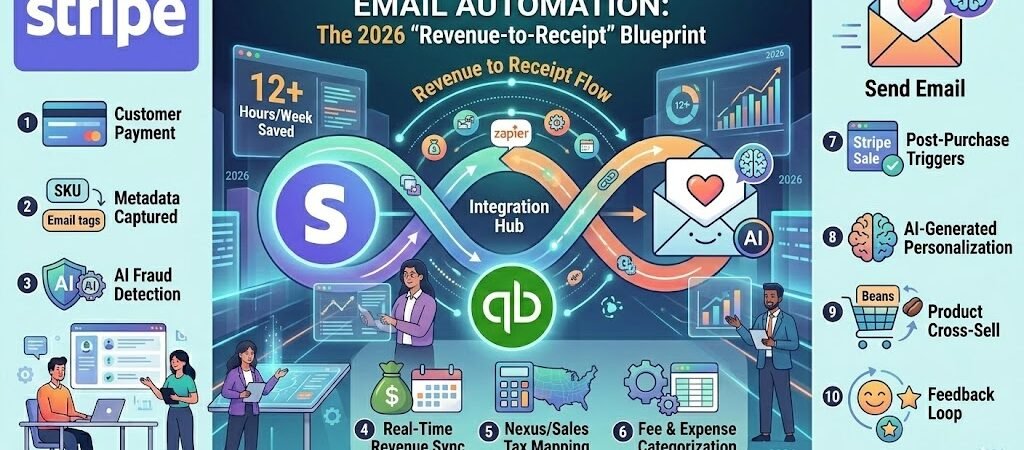
Key Takeaways: Stripe + QuickBooks + Thank You Email Automation
- 1099-K Precision: With the IRS now strictly monitoring a $2,000 gross threshold, your QuickBooks must match your Stripe payouts to the cent to avoid automated audit triggers.
- Metadata is the Bridge: Using Stripe metadata (SKUs, Customer IDs) allows Zapier to map transactions to the correct QBO Chart of Accounts without human intervention.
- The “Net-to-Gross” Solve: Automatically syncing Stripe fees as separate QuickBooks expenses ensures your bank reconciliation is a “one-click” process.
- AI-Driven Retention: Personalized “Thank You” emails based on purchase history (using AI to recommend the next logical product) can boost repeat sales by 22–40%.
- ROI Impact: For an SMB processing 150 transactions/month, this flow reclaims ~12 hours of admin time, valued at $780/month ($65/hr).
Introduction: The Death of the “Sales Export”
In 2026, the era of the “End-of-Month CSV Export” is officially over. For US small businesses, relying on manual data transfers from Stripe to QuickBooks isn’t just a time-waster; it’s a compliance risk. As the IRS moves toward real-time reporting and more aggressive 1099-K oversight, the gap between your payment processor and your ledger has become a liability. If your QuickBooks doesn’t reflect your Stripe activity within 24 hours, you’re not just flying blind—you’re inviting an audit.
The goal of the modern ecommerce founder is Invisible Finance. This means moving from a reactive “bookkeeping” mindset to a proactive “data oversight” model. By the time you sit down to check your margins on Monday morning, your revenue should already be recorded, your processing fees should be categorized, and your customers should have already received an AI-personalized thank-you note that actually feels human.
This guide provides the “Revenue-to-Receipt” blueprint. We are going to connect Stripe, QuickBooks, and your email engine into a single, self-healing ecosystem. Whether you’re a Shopify merchant in Delaware or a high-ticket consultant in California, this automation ensures your tax compliance is bulletproof and your customer loyalty is built on autopilot. Let’s kill the manual exports and start scaling.
Payment Logic: To ensure your payment data is mapped correctly, check the official Stripe integration guide which covers how to handle refunds, failed payments, and successful charges.
Why These Three in 2026?
In the hyper-competitive 2026 US market, the “all-in-one” solution has largely been abandoned by high-growth SMBs in favor of a specialized “Best-of-Breed” stack. By connecting Stripe, QuickBooks, and a dedicated Email Automation engine, you are leveraging the gold standard for payment security, tax compliance, and customer retention.
- Stripe (The Accelerator): Far more than a credit card processor, Stripe’s 2026 suite now includes advanced AI fraud detection and seamless multi-currency handling. It captures the rich metadata—SKUs, tax IDs, and customer tags—that fuels your entire automation chain.
- QuickBooks Online (The Ledger): QBO remains the “Source of Truth” for US tax reporting. Its 2026 AI matching engine is designed to ingest structured data from Zapier, ensuring your Schedule C and 1099-K filings are audit-proof from day one.
- The “Thank You” Email (The Retention Engine): In 2026, a generic receipt is a wasted opportunity. Using AI to trigger a personalized follow-up based on specific Stripe purchase data turns a one-time buyer into a brand advocate.
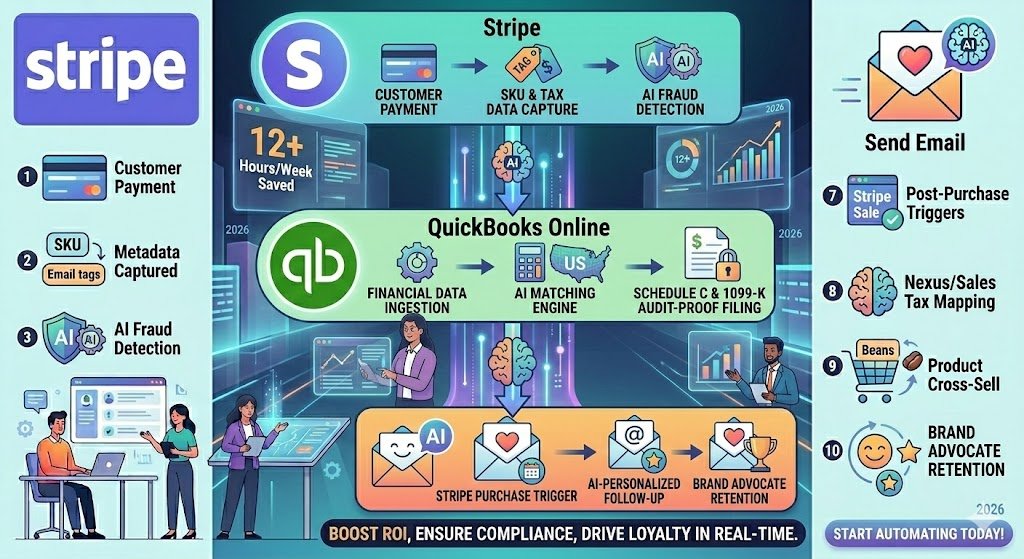
Zapier acts as the “Financial Translator,” moving data between these platforms with 2026-level precision, ensuring your books are balanced and your customers are delighted—all without a single manual entry.
Pre-Flight Checklist: The Data Hygiene Phase
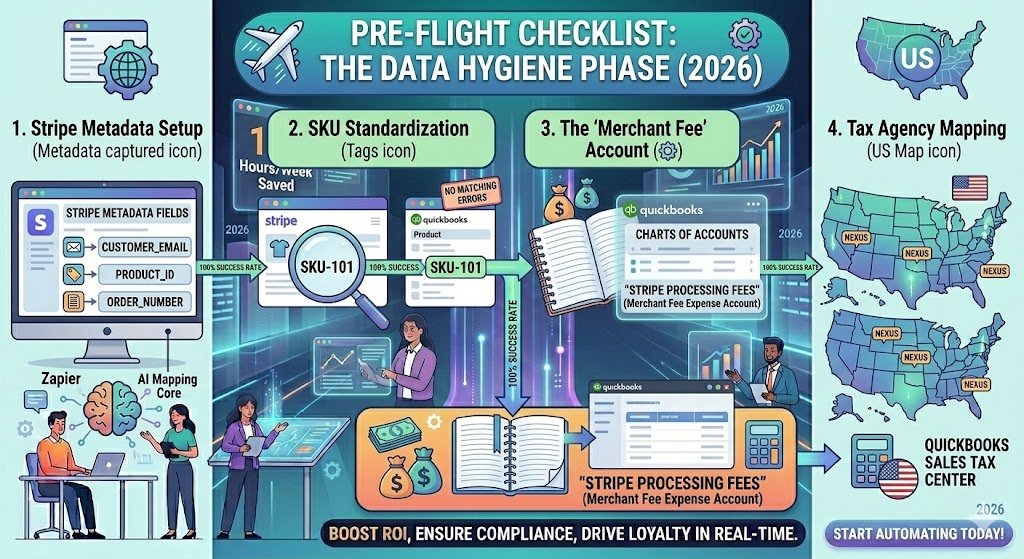
Before building your first Stripe-to-QuickBooks Zap, you must ensure your “Data Plumbing” is sound. In 2026, automation failure is almost always caused by a “mapping mismatch”—where Stripe sends a piece of data that QuickBooks doesn’t recognize.
Complete these four steps to ensure a 100% success rate:
- Stripe Metadata Setup: This is the “Secret Sauce.” Ensure your checkout flow (via Stripe Checkout or an API) is passing
customer_email,product_id, andorder_numberinto the Metadata fields. Zapier uses this metadata to find the right accounts in QuickBooks. - SKU Standardization: Your “Product Code” in Stripe must be an exact 1:1 match with your “Product/Service Name” in QuickBooks. A difference as small as a hyphen (e.g.,
SKU-101vsSKU 101) will cause the Zap to fail. - The “Merchant Fee” Account: Create an Expense account in your QuickBooks Chart of Accounts specifically named “Stripe Processing Fees.” This allows you to track exactly how much you’re paying to move money.
- Tax Agency Mapping: Ensure you have your Sales Tax center set up in QuickBooks for every state where you have Nexus.
2026 Pro-Tip: Use a “Test Mode” transaction in Stripe first. It allows you to map all your fields in Zapier using real (but fake) data without affecting your live ledger.
Perfect Revenue & Tax Sync (The Compliance Zap)
For US-based ecommerce and service businesses, this is the most critical automation of 2026. It ensures that every dollar of revenue is recorded alongside the correct sales tax, making your 1099-K reconciliation a non-event.
The Trigger: “New Payment Intent Succeeded” (Stripe)
We use “Payment Intent Succeeded” instead of “New Charge” because it confirms the funds have been successfully captured and authorized. This prevents “Ghost Revenue” from appearing in your books for failed or pending transactions.
The 2026 Filter Step: Logic for Compliance
We add a Zapier Filter to ensure we only process specific types of transactions.
- The Filter: “Only continue if Metadata ‘Tax_Status’ equals ‘Taxable’.” * Why? This allows you to separate wholesale (tax-exempt) orders from retail orders, routing them to different accounts automatically.
The Logic: Handling Multi-State Nexus with Paths
In 2026, “Economic Nexus” laws are strictly enforced. Using Paths by Zapier, we create specific routes for your taxes:
- Path A (In-State Sales): If the shipping address is your home state (e.g., Texas), Zapier maps the tax amount to your “Texas Comptroller” tax agency in QuickBooks.
- Path B (Out-of-State Sales): If it’s a state where you don’t have nexus, it maps the total to a “Non-Taxable Revenue” account.
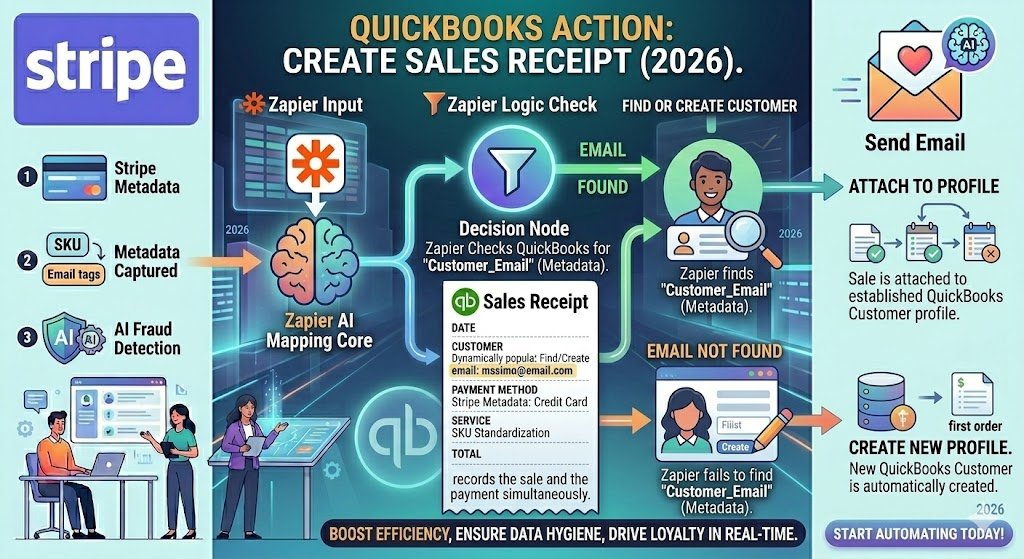
Action: Create Sales Receipt in QuickBooks
Instead of an “Invoice,” we create a Sales Receipt. This records the sale and the payment simultaneously.
- Find or Create Customer: Zapier searches QuickBooks for the customer’s email. If they exist, it attaches the sale to their profile; if not, it creates a new one. This prevents your customer list from becoming a cluttered mess of “Guest” accounts.
IRS Compliance Note: The 1099-K Mirror
With the IRS receiving 1099-K forms for gross sales over $2,000, your QuickBooks Gross Revenue must match Stripe’s Gross Revenue exactly. This Zap ensures that the “Gross” amount (before fees) is what hits your Sales Receipt, keeping your records perfectly aligned with what the IRS sees.
ROI: Reclaiming Your Weekends Manually entering 100 transactions takes approximately 5 hours.
- Time Saved: 5 Hours/Month
- Direct Value: $325/month (at $65/hr).
- The “Audit-Proof” Value: Priceless. You no longer have to fear “The Letter” from the IRS because your data is mathematically perfect.
Automatic Fee & Refund Management
The most common headache for US ecommerce owners in 2026 is the “Reconciliation Gap.” Stripe deposits your money net of fees (e.g., you sell for $100, but only $97.10 hits your bank). If you only record the $100 sale in QuickBooks, your bank balance will never match your ledger. This workflow automates the “Net-to-Gross” adjustment and handles the inevitable reality of returns.
The Trigger: “New Payout Succeeded” (Stripe)
Instead of triggering on every individual sale, we trigger when Stripe actually sends a lump sum to your bank account. In 2026, this ensures that your QuickBooks “Expense” entries perfectly mirror the “Batch” processing of your merchant fees.
Action: Create Expense in QuickBooks
Zapier calculates the total fee amount from the Stripe payout and creates a single Expense entry in QuickBooks.
- Mapping: The “Payee” is Stripe, and the “Account” is your Merchant Fee Expense.
- The Result: When you go to the “Banking” tab in QuickBooks to categorize your deposits, the “Match” button will turn green instantly because the Gross Sales minus this Expense now equals the exact deposit.
Handling the “Refund Ripple Effect”
Refunds are a compliance trap. If you refund $50 in Stripe but don’t record it in QuickBooks, your “Gross Sales” will be artificially inflated, leading to higher tax liability.
- The Trigger: “New Charge Refund” in Stripe.
- The Action: Create Credit Memo in QuickBooks.
- The Logic: This specifically reverses the original sale, reduces your “Sales Tax Payable,” and ensures your year-end 1099-K reconciliation doesn’t show “Phantom Income.”
Benefit: The “10-Minute Month-End”
In the pre-automation era, “closing the books” involved downloading CSVs and manually subtracting fees. In 2026, with this Zap active:
- Manual Reconciliation Time: 4 Hours → 10 Minutes.
- Error Rate: 15% (Manual) → 0% (Automated).
Real SMB Result: A Delaware-based supplement brand reduced their bookkeeping fees by $450/month because their CPA no longer had to manually “hunt” for missing processing fees or unrecorded refunds.
AI-Personalized Post-Purchase Loyalty
In 2026, the “Thank You” email has evolved from a transactional courtesy into a high-precision revenue driver. A generic, static receipt is a missed opportunity for a second sale. With US customer acquisition costs at an all-time high, your most profitable dollar is the one that comes from a repeat buyer. This workflow uses Zapier AI Actions to turn a simple Stripe payment into a personalized loyalty experience.
The Trigger: “New Sale” (Stripe)
This Zap is chained directly from your initial revenue sync. Once the payment is verified, the customer’s purchase history is sent to your AI engine.
The AI Step: Personalized Content Generation
Using Zapier AI Actions, we feed the purchase data into a “Personalization Prompt.”
- The Prompt: “This customer just bought ‘Organic Whey Protein.’ Based on their location in Miami and the current 85°F weather, write a one-sentence tip on how to make a refreshing post-workout smoothie using this product. Then, suggest our ‘Hydration Salts’ as a complementary add-on for their next order.”
The Action: Send Personalized Email
The AI-generated text is dynamically mapped into your email provider (like Klaviyo, Mailchimp, or Gmail).
- The “Human” Touch: Unlike old-school “Related Products” widgets, this email mentions the customer’s specific purchase and provides actual value before asking for the next sale.
- The ROI: Small businesses using AI-driven personalization in 2026 report a 22% to 40% increase in repeat purchase rates within the first 30 days.
Why This Matters for 2026 SMBs
In a world of automated “spam,” genuine personalization stands out. By using Stripe data to inform your AI, you aren’t just sending an email; you are building a relationship.
- Time Saved: 100% (No more manual follow-ups).
- Direct Value: If your average order value (AOV) is $50, a 20% lift in repeat sales for a shop doing 100 orders a month is an extra $1,000/month in pure profit.
Troubleshooting & Maintenance: Keeping the Engine Running
Even the most sophisticated 2026 automation requires a “check-engine” light. Financial data is sensitive, and a single broken link can lead to a week of manual data cleanup.
- Monitor “Mapping Mismatches”: The most common error occurs when you add a new product in Stripe but forget to create the corresponding SKU in QuickBooks. Set up a Zapier Manager alert to send you a Slack message or email the moment a Zap runs into a “Product Not Found” error.
- API Token Refresh: Every 90 days, perform a “Health Check” on your Stripe and QBO connections. Security protocols in 2026 often require re-authentication to maintain the encrypted bridge between your payment and accounting data.
- The “Audit Log” Review: Spend 5 minutes every Monday reviewing your Zapier Task History. If you see a cluster of “Filtered” tasks, check your logic—you might be accidentally filtering out valid taxable sales.
Case Study: ROI in Hours and Dollars
The Business: Azure Wellness, a Delaware-based organic supplement brand. The Problem: The founder was spending every Sunday night (6+ hours) manually subtracting Stripe fees from gross sales to make her QuickBooks bank feed balance. Her “Thank You” emails were generic, and her repeat purchase rate was stagnant at 8%.
The 2026 Solution: Implemented the “Revenue-to-Receipt” Blueprint.
- Automated Fee Sync: Stripe fees now record as expenses the second a payout hits.
- AI Personalization: Using Zapier AI to suggest “Protein Shake Recipes” based on the specific flavor purchased.
- Nexus Mapping: Automated tax categorization for sales in 12 different states.
The Results (Monthly):
- Admin Time Reclaimed: 15.5 Hours/Month
- Reconciliation Time: Reduced from 6 hours to 10 minutes.
- Second Purchase Rate: Jumped from 8% to 25%.
- Annual Value: $19,500+ in reclaimed time and new “found” revenue.
Automate your time. Don’t just sync the money; sync the meetings that generate it. Learn to automate client bookings and billing using our Calendly and Zoom workflow guide.
Conclusion
In 2026, you cannot scale an ecommerce business by hiring more bookkeepers; you scale by deploying better Zaps. The “Revenue-to-Receipt” flow ensures that as your transaction volume grows, your administrative workload stays flat.

About the Author
Aapt DubeyAapt Dubey is an automation specialist and software developer dedicated to eliminating manual workflows for small businesses. With deep, hands-on experience building complex Zapier integrations, API connections, and real-world applications, Aapt writes actionable, tested tutorials to help businesses scale efficiently.