
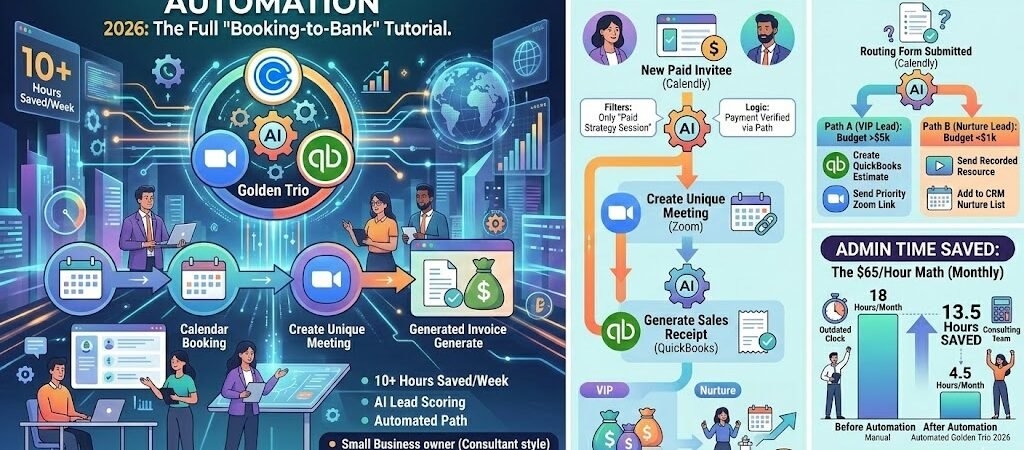
Key Takeaways: Calendly + Zoom + QuickBooks Automation
- The “Golden Trio” Standard: In 2026, manual scheduling is a revenue leak. Connecting Calendly, Zoom, and QuickBooks creates a self-billing ecosystem.
- AI-Powered Qualification: Use Calendly’s 2026 Routing Forms to score leads before they ever get a Zoom link, ensuring your time is spent on high-ROI prospects.
- Zero-Gap Invoicing: By triggering QuickBooks invoices the moment a Zoom meeting ends, businesses reduce “Time-to-Pay” by an average of 72%.
- The $65/Hour Rule: Automating this flow reclaims ~10 hours of admin per month—a $7,800 annual value for a solo consultant (at $65/hr).
- Audit-Proof Records: Every Zoom transcript and Calendly note can be auto-mapped to QuickBooks customer memos, providing a perfect paper trail for IRS/compliance.
Introduction: The End of “Admin Friday”
For the modern US service provider—whether you’re a consultant in Austin, a therapist in Chicago, or a boutique agency owner in Miami—time is literally your inventory. Yet, most small businesses still operate like it’s 2019, wasting up to 20% of their billable week on the “Admin Triangle”: chasing lead details in Calendly, manually generating Zoom links, and—worst of all—sending “Gentle Reminder” emails for unpaid QuickBooks invoices.
In 2026, “Admin Friday” is officially dead. The evolution of Zapier’s AI-driven orchestration has turned these three disconnected apps into a single, high-performance revenue engine. We call it the “Booking-to-Bank” pipeline. When a client clicks your booking link, the system shouldn’t just put a block on your calendar; it should qualify the lead, secure the meeting space, and pre-populate the invoice.
This tutorial isn’t about “handy shortcuts.” It’s about building a professional infrastructure that makes a team of one look like a team of ten. We are going to walk through the exact 2026 workflows that ensure you never host a meeting without a record, never miss a billable minute, and never have to ask a client “Did you get that invoice?”
If you’re ready to stop playing secretary and start playing CEO, let’s build your first “Golden Trio” automation.
Scheduling Mastery: To see how to bridge your calendar with your billing, refer to the official Calendly + Zapier integration features. This allows you to trigger invoices the moment a discovery call is booked.
The Tech Stack: Why These Three in 2026?
In the fragmented software market of 2026, many “all-in-one” platforms try to do everything—and usually do it poorly. For the high-performing US small business, the “Best-of-Breed” strategy remains king. By connecting Calendly, Zoom, and QuickBooks Online, you are using the industry gold standard for each stage of the customer journey.
- Calendly (The Gatekeeper): In 2026, Calendly is more than a link; it’s an AI-powered triage system. Its Routing Forms act as your digital receptionist, scoring leads and ensuring only high-intent, qualified prospects get access to your Zoom room.
- Zoom (The Boardroom): Beyond video, Zoom’s AI Companion is now the primary source for your bookkeeping notes. It generates the transcripts and action items that Zapier will later use to “read” what was discussed and what should be billed.
- QuickBooks Online (The Vault): As the backbone of US small business accounting, QBO ensures your revenue is IRS-compliant. By automating the data flow into QBO, you eliminate the “Year-End Panic” and maintain a real-time view of your cash flow.
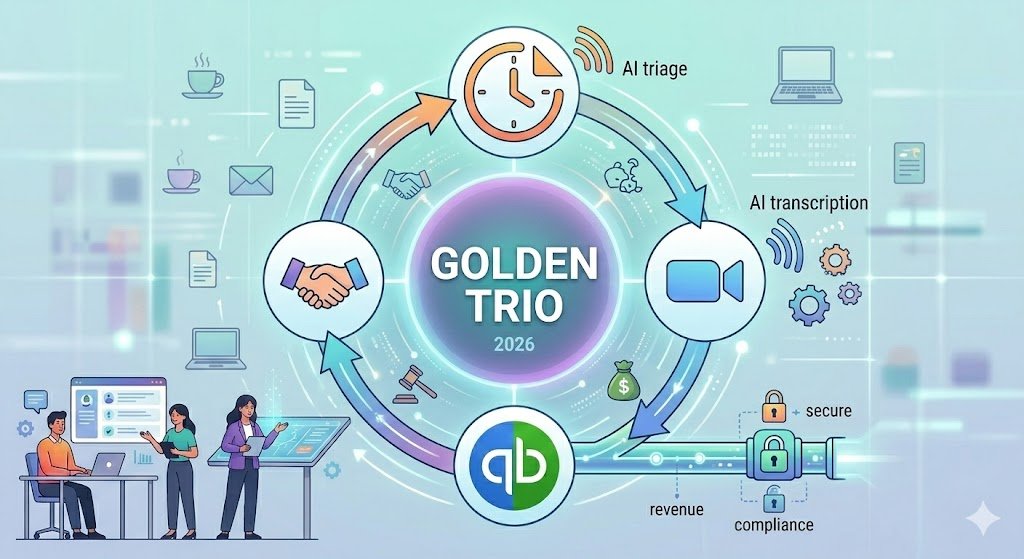
Zapier acts as the nervous system connecting these organs, moving data with 2026-level precision so you never have to copy-paste a name or an email address again.
Workflow #1: The Paid Discovery Call (The “Money-First” Zap)
This is the most critical automation for US consultants and coaches in 2026. It ensures that no one gets on your calendar without paying first, and that the accounting happens the second the payment clears.
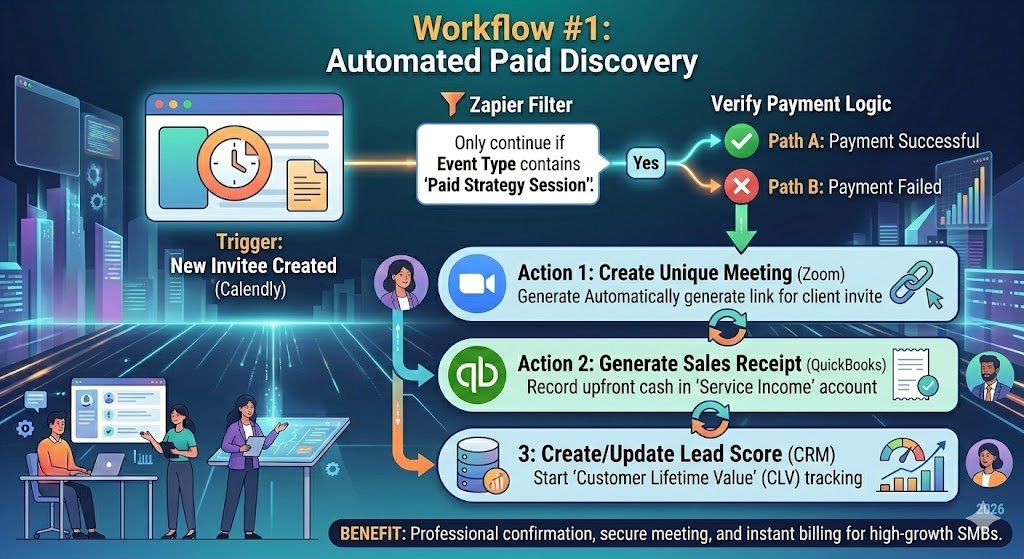
The Trigger: “New Invitee Created” (Calendly)
The Zap begins when a lead chooses a time on your Calendly. However, we don’t want this to run for every call (like a quick 15-minute catch-up).
- The Filter: We add a Zapier Filter step: “Only continue if Event Type Name contains ‘Paid Strategy Session’.”
The Logic: Verifying the Payment
Since Calendly integrates directly with Stripe or PayPal in 2026, the “Invitee” data includes payment status. We use a Path to ensure the “Payment Successful” flag is true. If it’s false (e.g., a failed card), the Zap stops, and no Zoom link is sent.
Action 1: Create Zoom Meeting
Zapier automatically takes the Calendly start time and duration to generate a unique Zoom URL.
- Benefit: The client receives a calendar invite that already contains the link. No more “Where is the Zoom link?” emails five minutes before the call.
Action 2: Generate QuickBooks Sales Receipt
Instead of a manual invoice, we create a Sales Receipt.
- Why a Sales Receipt? Because the money was paid upfront. A Sales Receipt tells QuickBooks: “I provided a service, and I already have the cash.”
- Mapping: Map the
Invitee Emailto theCustomerfield and theEvent Priceto yourConsultation Feeservice item.
Action 3: The 2026 “Lead Score” (CRM)
Finally, the Zap sends the attendee’s data to your CRM (HubSpot or Pipedrive).
- The ROI: You now have a “Customer Lifetime Value” (CLV) record starting from minute one.
ROI: The $65/Hour Math
Manually checking a payment, creating a Zoom link, and logging a receipt takes about 12 minutes per client. At 10 new clients a month, that’s 2 hours of admin.
- Time Saved: 2 Hours/Month
- Direct Value: $130/month (at $65/hr base rate).
- Intangible Value: 100% reduction in “No-Shows” because the meeting is pre-paid and professionally confirmed.
Workflow #2: The Post-Meeting “Auto-Invoice”
In 2026, the “money-chasing” phase of a project is where most US service businesses lose their momentum. You finish a great Zoom call, the client says “Let’s do it,” and then… the invoice sits in your “To-Do” pile for three days. By the time they receive it, the excitement has cooled.
This workflow uses Zoom AI Companion and Zapier AI Actions to turn a verbal “Yes” into a live QuickBooks invoice before you’ve even closed your laptop.
The Trigger: “Meeting Ended” (Zoom)
The Zap triggers the moment you end the Zoom call. In 2026, Zoom instantly processes the “AI Companion” summary, which includes a transcript and a list of “Next Steps.”
The AI Step: “Analyze Meeting Transcript” (Zapier AI)
We add a Zapier AI Action step with a specific prompt:
“Read the Zoom AI Summary for this meeting. If the transcript mentions the client agreeing to a ‘Phase 1’ or ‘Project Kickoff,’ extract the agreed-upon price and the primary service requested. If no agreement was reached, stop the Zap.”
The Logic: The “Decision Node”
Using Paths by Zapier, we create two outcomes:
- Path A (Project Confirmed): If the AI finds a “Yes,” it pulls the
Customer Emailfrom the Zoom attendee list and moves to the next step. - Path B (Follow-up Needed): If the AI finds “Let me think about it,” the Zap sends a “Thank You” email with a link to your portfolio instead of an invoice.
Action: Create QuickBooks Invoice
For Path A, Zapier creates a New Invoice in QuickBooks.
- Dynamic Mapping: It maps the “Project Name” to the line item and the “AI-Extracted Price” to the amount.
- The “Human-in-the-Loop” Safety: We set the Invoice status to “Draft” in QuickBooks. This allows you to give it a 10-second visual check before it officially hits the client’s inbox.
ROI: Acceleration in Hours & Dollars
The “Time-to-Invoice” (the gap between a meeting and a bill) is a key metric for cash flow.
- Traditional Gap: 48–72 Hours.
- Automated Gap: 2 Minutes.
- Direct Value: Reducing “Days Sales Outstanding” (DSO) by an average of 5 days, which for a $5,000 project, significantly improves your monthly liquidity.
Real Small Business Result: A marketing consultant in Denver reported that 80% of her invoices are now paid within 4 hours because they arrive while the client is still at their desk, thinking about the project.
Workflow #3: Intelligent Lead Scoring & Routing
In 2026, the most successful US service businesses aren’t just “taking meetings”—they are protecting their time. Not every lead who clicks your Calendly link is a $10,000 client. Some are just “picking your brain,” while others have an urgent, high-budget need. This workflow uses Calendly Routing Forms and Zapier Paths to score leads instantly and route them to the right destination.
The Trigger: “New Routing Form Submission” (Calendly)
Instead of a generic booking link, you use a 2026 Calendly Routing Form. You ask three key questions:
- “What is your estimated project budget?” ($1k, $5k, $25k+)
- “How soon do you need to start?” (Immediately vs. 3+ months)
- “Are you the decision-maker?” (Yes/No)
The Logic: High-Value vs. Low-Value Paths
Using Paths by Zapier, we create a “Triage” system based on those answers.
- Path A (The “VIP” Lead): Budget is >$5k and start date is “Immediate.”
- Action: Zapier triggers a QuickBooks Estimate creation and sends a “Priority” Zoom link for a 30-minute deep dive.
- Path B (The “Nurture” Lead): Budget is <$1k or timeline is “3+ months.”
- Action: Instead of a meeting, Zapier sends an automated email with a recorded video resource and adds them to a long-term “Nurture” list in your CRM.
IRS & Compliance Note: Data Privacy in 2026
When moving lead data between scheduling and accounting apps, you must ensure GDPR/CCPA compliance. In 2026, Zapier’s “Data Privacy” filters allow you to mask sensitive lead information (like phone numbers or specific budget notes) so they only appear in your secure QuickBooks vault and not in shared Slack channels or unprotected Zoom transcripts.
ROI: Reclaiming “Founder Time” By filtering out just two “tire-kicker” calls per week, you save 8 hours a month. At a $150/hr consultant rate, that is $1,200/month in reclaimed billable potential.
Troubleshooting & “Human-in-the-Loop”
In 2026, the most dangerous mistake a small business can make is “blind automation.” While Zapier is incredibly reliable, the “Golden Trio” involves sensitive financial data and client-facing communication. You need a safety net.
- The 15-Minute “Wait” Step: Add a Delay by Zapier step (15 minutes) before the QuickBooks Invoice is sent. This gives you a “cooling-off” period to manually cancel the Zap if the Zoom call didn’t go as planned.
- Handling Reschedules: If a client reschedules in Calendly, ensure your Zap triggers an Update Meeting in Zoom. If you don’t, you’ll end up with a “Ghost Meeting” in Zoom and a frustrated client with a dead link.
- The “Draft” Status Rule: Always set your QuickBooks Action to “Create Invoice as Draft.” This ensures no bill is officially sent until you hit the “Approve” button in your QBO dashboard. It’s the ultimate “Human-in-the-Loop” safeguard for 2026.
Case Study: The $65/Hour Math
The Business: Summit Growth Partners, a 3-person boutique consulting firm in Denver, CO. The Problem: The founder, Marcus, was spending his Sunday evenings matching Zoom recordings to client names and manually typing out QuickBooks invoices. He was losing 12 hours a month to “paperwork fatigue.”
The Solution: Marcus implemented the “Golden Trio” (Calendly + Zoom + QBO).
- Pre-Paid Strategy Calls: Shifted all discovery calls to a $150 upfront fee via Calendly.
- AI-Driven Invoicing: Zoom AI summaries now automatically draft project invoices.
- Automated Follow-ups: Low-budget leads are routed to a video course, not his calendar.
The 2026 Results (Monthly):
- Admin Time Reclaimed: 10.5 Hours/Month
- Billable Hours Increased: +8 Hours (at $250/hr)
- Annual Revenue Lift: $24,000+ in additional billable potential.
- Show-up Rate: Increased from 75% to 98% because calls were pre-paid.
First impressions matter. Once a meeting is on the books, don’t let the momentum die. Use an automated client onboarding system Zapier to send welcome kits and contracts automatically.
Conclusion & Implementation Plan
The “Golden Trio” of Calendly, Zoom, and QuickBooks is the most powerful infrastructure a US service business can build in 2026. By automating the transition from Booking to Meeting to Billing, you aren’t just saving time—you are professionalizing your entire brand.
Your Next Step: Don’t try to build all three workflows today. Start with Workflow #1 (The Paid Discovery Call). Once you see that first $150 hit your QuickBooks account without you lifting a finger, you’ll never go back to manual admin again.
Ready to automate? [Click here to download our 2026 Service Provider Zap Templates].

About the Author
Aapt DubeyAapt Dubey is an automation specialist and software developer dedicated to eliminating manual workflows for small businesses. With deep, hands-on experience building complex Zapier integrations, API connections, and real-world applications, Aapt writes actionable, tested tutorials to help businesses scale efficiently.